
How to Remove Air Bubbles from Your Screen Protector Quickly and Easily
By:Admin
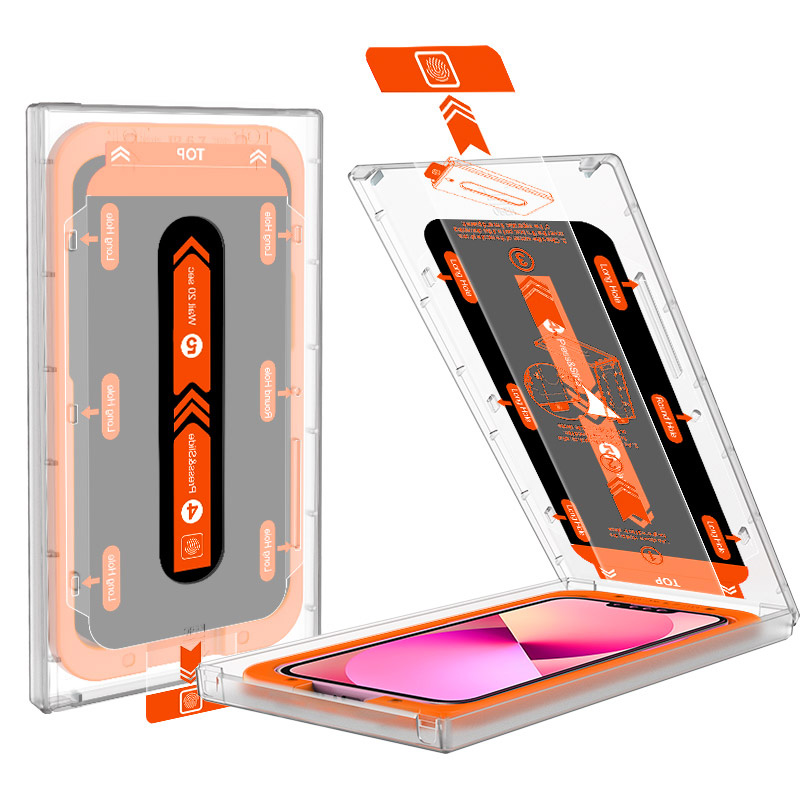
In today’s digital age, protecting your smartphone screen is more essential than ever. Screen protectors are a cost-effective and efficient way to guard against scratches, cracks, and everyday wear and tear. However, one common issue many users face during installation is the appearance of unsightly air bubbles trapped beneath the protector. These bubbles not only affect the visual clarity but also diminish the touch sensitivity of your device. Fortunately, with the right techniques and a bit of patience, you can achieve a flawless, bubble-free finish.
### Understanding the Air Bubble Problem
Air bubbles typically occur when small pockets of air get trapped between the screen protector and the device screen during application. This can happen for several reasons: dust particles on the screen, improper alignment, or using an old or damaged screen protector. Regardless of the cause, managing air bubbles is critical to maintaining both the aesthetic and functional qualities of your device screen.
### Step-by-Step Guide to Removing Air Bubbles
#### 1. **Clean the Screen Thoroughly**
Before applying the screen protector, ensure your device’s screen is spotless. Use a microfiber cloth and a cleaning solution, or alcohol wipes specifically designed for electronics, to remove oils, fingerprints, and dust. Dust particles are often the main culprit behind persistent bubbles.
#### 2. **Use a Dust Removal Sticker**
Many screen protector kits include a dust removal sticker. After cleaning, gently dab the sticker across the entire screen to lift any remaining dust particles. If your kit doesn’t have one, a piece of scotch tape can work as an alternative.
#### 3. **Align Carefully and Apply Slowly**
When positioning your screen protector, start at one edge—usually the top or bottom—and slowly lower it onto the screen. This minimizes air being trapped underneath. Use your fingers or a soft edge such as a plastic card to press the protector down as you go, pushing air outwards.
#### 4. **Push Out Bubbles with a Soft Card**
If bubbles still appear, use a credit card or a squeegee wrapped in a microfiber cloth to gently push air bubbles toward the edges. The key is a steady, firm pressure—don’t rush, as this could cause the protector to stretch or crack.
#### 5. **Try Using Gentle Heat**
For stubborn bubbles that resist removal, applying gentle heat can be helpful. Use a hairdryer on a low setting held about 6 inches away from the phone to warm the screen protector slightly, making it more pliable. Then, push the bubbles out with your card as before.
#### 6. **Lift and Reapply If Necessary**
If bubbles remain trapped near the edges and cannot be pushed out, carefully lifting the screen protector with a thin, sharp tool (like a fingernail or tweezers) and reapplying it might be necessary. Take care to avoid dust contamination during this process by working in a clean, dust-free environment.
### Tips for a Perfect Application
- **Work in a Dust-Free Environment:** Applying the screen protector in a steamy bathroom or against a white background helps reveal dust particles you might not otherwise see.
- **Avoid Rushing:** Take your time during both cleaning and application. Patience is crucial.
- **Use High-Quality Screen Protectors:** Higher-grade protectors are designed for easier application and fewer bubbles.
### Why Protecting Your Screen Matters
Smartphones are not just communication devices—they are central to our daily lives for social interaction, work, entertainment, and more. A screen protector preserves the screen’s clarity and touch sensitivity, extending the lifespan of your device and protecting its resale value. Moreover, many modern protectors offer additional benefits such as anti-glare, fingerprint resistance, and even tempered glass layers that absorb shocks.
---
### About Our Company
[Company Name] has been a trusted leader in mobile accessories, offering a wide range of protective solutions designed to enhance and safeguard your digital lifestyle. Committed to innovation and quality, we prioritize user experience by providing screen protectors that combine durability with ease of installation. Our products undergo rigorous testing to ensure compatibility and performance across the latest smartphone models.
At [Company Name], customer satisfaction is at the heart of what we do. We continually invest in research and development to improve our offerings and deliver cutting-edge protection that adapts to evolving technology. With comprehensive guidance and responsive customer support, we empower our users to enjoy their devices without compromise.
---
### Final Thoughts
Air bubbles don’t have to ruin your screen protector experience. By following these simple steps and investing in quality products, you can enjoy a crystal-clear, bubble-free screen that keeps your device looking and functioning like new. Whether you’re a tech novice or a smartphone veteran, a little care during application makes all the difference.
Protect your screen smartly, and keep your digital world pristine. For more tips and premium screen protectors, visit [Company Website].